Static Routing

Static routing is a straight forward process. If you want packets to be routed between two routers, update each router’s routing table with the network address of the other router as well as the path to get there

This is how it is done,
  • Name the routers and give the Ethernet and Serial ports desired IP address

  • When you give IP addresses, make sure the serial link that connects both the router are in same network

  • Add the destination network to each router’s routing table using the add route command in the Global config mode.

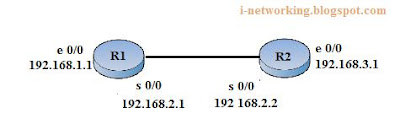
Let’s configure static routing in the network shown below,
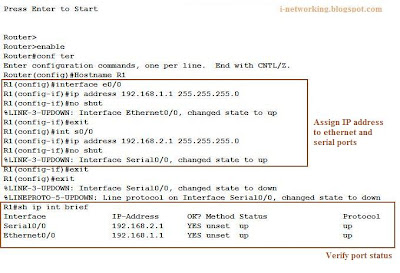
  • Assign IP address to the Ethernet and Serial ports of the first router R1
  • Set the clock rate to 64000 at the serial port of DCE - Data Communication End. When two routers are connected in a network, one acts as the DCE and the other as a DTE – Data Termination End

.

  • Now add the destination network to the routing table and check whether it is connected serially using show ip route command


  • The same procedure is done on the second router. Once this is done, you can ping all the ports successfully

Digg ThisAdd To Del.icio.us Add To Furl Add To Reddit Fav This With Technorati Add To Yahoo MyWeb Add To Newsvine Add To Google Bookmarks Add To Bloglines Add To Ask Add To Windows Live Add To Slashdot Stumble This

Routing Basics

Routing Basics
The router must know the following details in order to route packets to the destined address
  • Destination Address
  • Neighbor routers from which it can learn about remote networks
  • Possible routes to all remote networks
  • The best route to each remote network

The router can learn these information from the neighboring router or an administrator can manually feed all these information. In dynamic routing, the routing table is automatically updated with all these information. In case of static routing an administrator has to manually feed in the network details of the neighboring as well as remote networks for the packet to be route and every time a device is added or removed, the administrator has to manually update each and every routing table

Digg ThisAdd To Del.icio.us Add To Furl Add To Reddit Fav This With Technorati Add To Yahoo MyWeb Add To Newsvine Add To Google Bookmarks Add To Bloglines Add To Ask Add To Windows Live Add To Slashdot Stumble This